Introducing SolveBeat Shield: 29 real checks, watching your servers around the clock
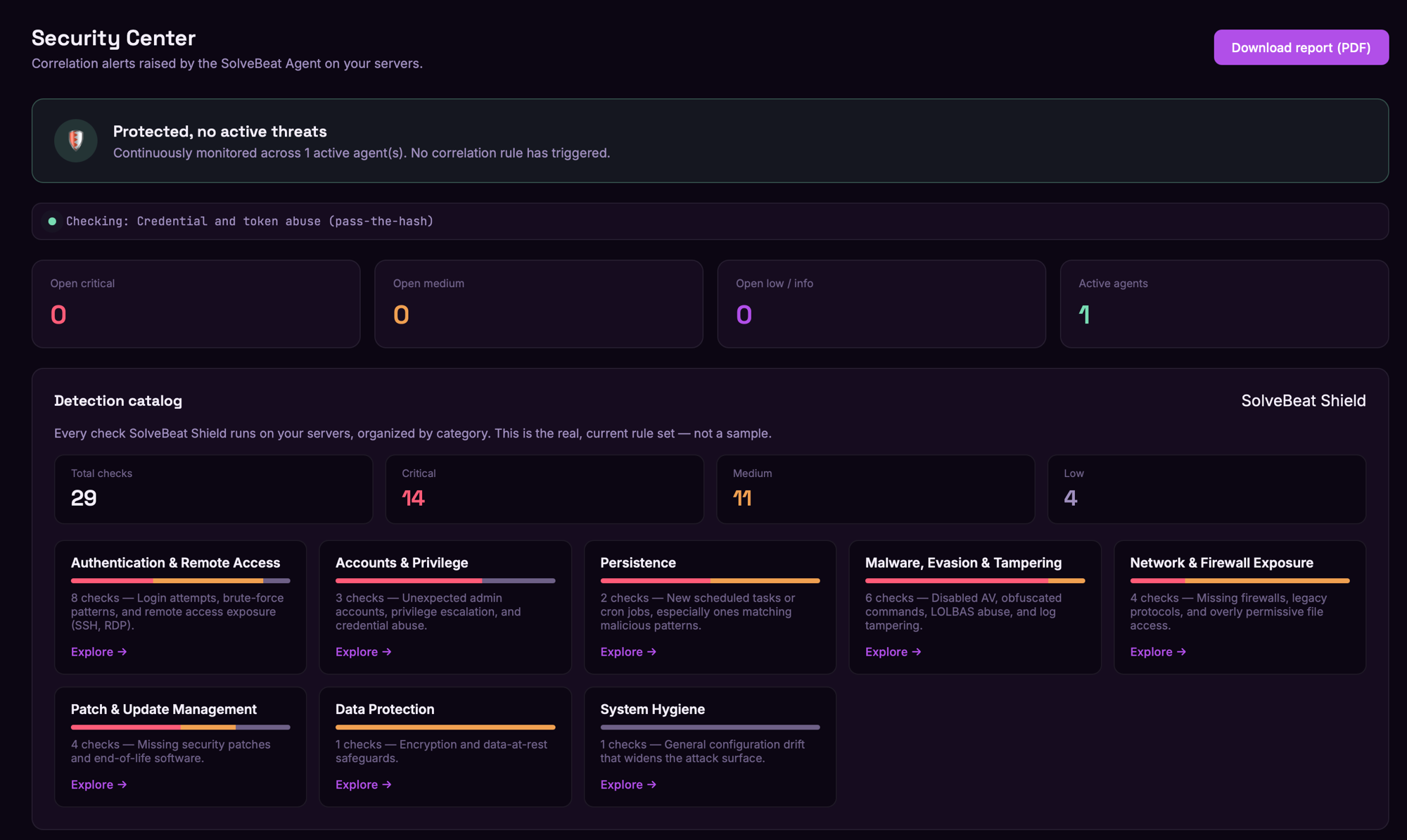
Most "security monitoring" tools show you a dashboard full of green checkmarks and hope you never ask what's actually behind them. We wanted the opposite: a Security Center where every number is real, every category is something we actually check for, and nothing is padded to look more impressive than it is.
That's SolveBeat Shield.
What it actually does
A lightweight agent runs on your server, checking for the kinds of things that matter in a real incident — not a generic vulnerability scan, but active correlation: failed logins followed by a successful one, a new admin account that shouldn't exist, a scheduled task that matches known malicious patterns, commands that look deliberately obfuscated.
Everything runs locally. The agent never sends your raw logs anywhere — only the result of a check, when something actually matches. You can read the agent script yourself before you install it; that's the point of it being plain, readable bash and PowerShell.
The detection catalog — no inflated numbers
We built a full catalog of what SolveBeat Shield checks for, organized by category, and we made a deliberate choice: show the real count, not a marketing number.
Right now that's 29 checks across 8 categories:
- Authentication & Remote Access (8) — login attempts, brute-force patterns, SSH/RDP exposure
- Accounts & Privilege (3) — unexpected admin accounts, privilege escalation, credential abuse
- Persistence (2) — new scheduled tasks, especially ones matching malicious patterns
- Malware, Evasion & Tampering (6) — disabled antivirus, obfuscated commands, LOLBAS abuse, log tampering
- Network & Firewall Exposure (4) — missing firewalls, legacy protocols, permissive file access
- Patch & Update Management (4) — missing security patches, end-of-life software
- Data Protection (1) — encryption posture
- System Hygiene (1) — configuration drift that widens the attack surface
Every check is broken down by severity (critical, medium, low), and you can expand any category to see exactly what's being checked — not a black box.
When something fires, you get more than a title
A finding on its own ("Pending security updates") doesn't help much without knowing which package, why it matters, and what to actually run. So every finding that supports it comes with concrete guidance: which packages or advisories are affected, and the exact command to check the CVE behind it before you patch.
Built to be shown, not just used
The Security Center is designed so you can hand it to a client or a stakeholder and it explains itself: a live status banner (protected / attention needed), a plain-language activity feed, and — when there's nothing to report — an honest "no correlation rule has triggered" instead of manufactured activity.
Because the best security dashboard isn't the one with the most alerts. It's the one you actually trust.